> ## Documentation Index
> Fetch the complete documentation index at: https://auth0-actions-triggers-prototype.mintlify.site/llms.txt
> Use this file to discover all available pages before exploring further.
> Describes how to export your logs in near real-time using log streaming.
# Log Streams
Log streams are designed for monitoring and analytics purposes. We don't recommend using log streams in your application's critical path or for real-time decision-making.
By default, logs may not display in the exact order in which they occurred. If you are streaming tenant logs and require chronological sorting, we recommend implementing log sorting through your stream processing.
Auth0's log streaming service allows you to export tenant logs to a log analysis service. You can choose the content type and form and preview the payload using the Auth0 Dashboard. Log streaming allows you to react to log events like password changes or new registrations with your own business logic. Using the Auth0 Dashboard and API, you can pause a stream, view and update settings, and check the health of the stream.
By enabling Log Streams, Customer becomes the Controller of such information and is responsible for the data exported from the Auth0 Platform, including what information is streamed and how it is used by Customer.
You can create a new log stream in the Auth0 Dashboard using one of the services we support or you can configure a stream to a service you already use with a custom webhook.
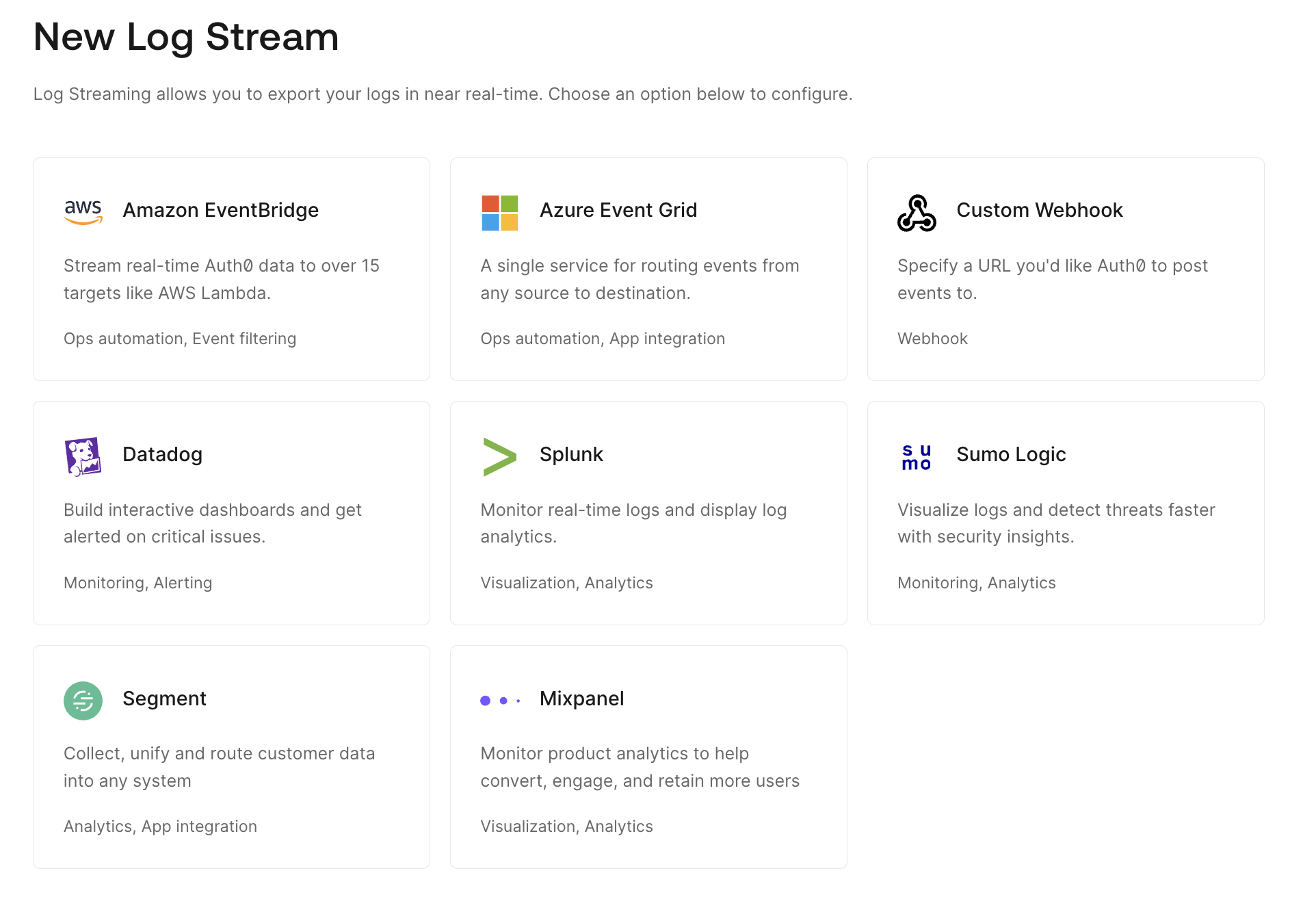 ## Supported log streaming services
We support a variety of [log streaming services](https://marketplace.auth0.com/features/log-streaming) through the [Auth0 Marketplace](https://marketplace.auth0.com), including:
* [Amazon EventBridge](https://marketplace.auth0.com/integrations/amazon-log-streaming)
* [Azure Event Grid](https://marketplace.auth0.com/integrations/azure-log-streaming)
* [Elastic](https://marketplace.auth0.com/integrations/elastic-security)
* [Logz.io](https://marketplace.auth0.com/integrations/logz-io)
* [MDR ONE](https://marketplace.auth0.com/integrations/mdr-one)
* [Mixpanel](https://marketplace.auth0.com/integrations/mixpanel-log-streaming)
* [Oodle AI](https://marketplace.auth0.com/integrations/oodle)
* [Oort](https://marketplace.auth0.com/integrations/oort)
* [Pangea](https://marketplace.auth0.com/integrations/pangea-log-streaming)
* [Panther](https://marketplace.auth0.com/integrations/panther-log-stream)
* [Perch Security](https://marketplace.auth0.com/integrations/perch-security-log-streaming)
* [Segment](https://marketplace.auth0.com/integrations/segment-log-streaming)
* [Slack](https://marketplace.auth0.com/integrations/slack-log-streaming)
* [Datadog](https://marketplace.auth0.com/integrations/datadog-log-streaming)
* Auth0 provides Datadog dashboard templates. To learn more, read [Use Auth0 Dashboard Templates with Datadog](/docs/customize/log-streams/datadog-dashboard-templates).
* [Splunk](https://marketplace.auth0.com/integrations/splunk-log-streaming)
* Auth0 also provides a dashboard to visualize the data from your Auth0 tenant. You can use the app to view recommended aggregations from Auth0 or to use them as a starting point to create your own custom visualizations. To learn more, read [Use Auth0 App for Splunk](/docs/customize/log-streams/splunk-dashboard).
* [Sumo Logic](https://marketplace.auth0.com/integrations/sumo-logic-log-streaming)
* Auth0 provides a Sumo Logic app and dashboard to visualize and monitor the health of login traffic from your Auth0 tenant. You can also use to view recommended aggregations from Auth0 or to use them as a starting point to create your own custom visualizations. To learn more, read [Use Auth0 App for Sumo Logic](/docs/customize/log-streams/sumo-logic-dashboard).
## Delivery attempts
Auth0 delivers each log to your server as it is triggered in our system. We guarantee logs are delivered at least once.
When a log is triggered:
1. We attempt to deliver the log to your server up to three times.
2. If we fail to reach your server by the third attempt, we log an error visible in the **Health** view for the log stream.
3. We restart this process for any errored log until the problem is resolved.
If we fail to reach your server for 7 consecutive days, we'll automatically pause the stream. You'll need to resolve the issue, and then resume the stream manually.
## Log retention
Your Auth0 log retention period depends on your [subscription level](/docs/deploy-monitor/logs/log-data-retention).
If there is an issue where your server does not receive logs sent from Auth0, you can delete the stream and then recreate it with the Starting Cursor field set to a specific day and time within the retention period.
## Filtering and PII obfuscation
Customers can choose which [filter categories](/docs/deploy-monitor/logs/log-event-filters) of their logs to stream and which to exclude to ensure the external destination receives only the relevant data. Customers can also choose to mask or hash Personal Identifiable Information (PII) in the streamed logs.
### PII obfuscation
Auth0 provides two ways to obfuscate PII tenant log fields when streaming to third-party destinations:
* **Masking:** the field values are replaced with asterisks
* **xxHash:** a fast, non-cryptographic hash algorithm
The customer can obfuscate the following log data and field names when streaming:
| Data | Field name |
| ------------ | --------------------------------------------------------------------------- |
| `first_name` | `first_name`
## Supported log streaming services
We support a variety of [log streaming services](https://marketplace.auth0.com/features/log-streaming) through the [Auth0 Marketplace](https://marketplace.auth0.com), including:
* [Amazon EventBridge](https://marketplace.auth0.com/integrations/amazon-log-streaming)
* [Azure Event Grid](https://marketplace.auth0.com/integrations/azure-log-streaming)
* [Elastic](https://marketplace.auth0.com/integrations/elastic-security)
* [Logz.io](https://marketplace.auth0.com/integrations/logz-io)
* [MDR ONE](https://marketplace.auth0.com/integrations/mdr-one)
* [Mixpanel](https://marketplace.auth0.com/integrations/mixpanel-log-streaming)
* [Oodle AI](https://marketplace.auth0.com/integrations/oodle)
* [Oort](https://marketplace.auth0.com/integrations/oort)
* [Pangea](https://marketplace.auth0.com/integrations/pangea-log-streaming)
* [Panther](https://marketplace.auth0.com/integrations/panther-log-stream)
* [Perch Security](https://marketplace.auth0.com/integrations/perch-security-log-streaming)
* [Segment](https://marketplace.auth0.com/integrations/segment-log-streaming)
* [Slack](https://marketplace.auth0.com/integrations/slack-log-streaming)
* [Datadog](https://marketplace.auth0.com/integrations/datadog-log-streaming)
* Auth0 provides Datadog dashboard templates. To learn more, read [Use Auth0 Dashboard Templates with Datadog](/docs/customize/log-streams/datadog-dashboard-templates).
* [Splunk](https://marketplace.auth0.com/integrations/splunk-log-streaming)
* Auth0 also provides a dashboard to visualize the data from your Auth0 tenant. You can use the app to view recommended aggregations from Auth0 or to use them as a starting point to create your own custom visualizations. To learn more, read [Use Auth0 App for Splunk](/docs/customize/log-streams/splunk-dashboard).
* [Sumo Logic](https://marketplace.auth0.com/integrations/sumo-logic-log-streaming)
* Auth0 provides a Sumo Logic app and dashboard to visualize and monitor the health of login traffic from your Auth0 tenant. You can also use to view recommended aggregations from Auth0 or to use them as a starting point to create your own custom visualizations. To learn more, read [Use Auth0 App for Sumo Logic](/docs/customize/log-streams/sumo-logic-dashboard).
## Delivery attempts
Auth0 delivers each log to your server as it is triggered in our system. We guarantee logs are delivered at least once.
When a log is triggered:
1. We attempt to deliver the log to your server up to three times.
2. If we fail to reach your server by the third attempt, we log an error visible in the **Health** view for the log stream.
3. We restart this process for any errored log until the problem is resolved.
If we fail to reach your server for 7 consecutive days, we'll automatically pause the stream. You'll need to resolve the issue, and then resume the stream manually.
## Log retention
Your Auth0 log retention period depends on your [subscription level](/docs/deploy-monitor/logs/log-data-retention).
If there is an issue where your server does not receive logs sent from Auth0, you can delete the stream and then recreate it with the Starting Cursor field set to a specific day and time within the retention period.
## Filtering and PII obfuscation
Customers can choose which [filter categories](/docs/deploy-monitor/logs/log-event-filters) of their logs to stream and which to exclude to ensure the external destination receives only the relevant data. Customers can also choose to mask or hash Personal Identifiable Information (PII) in the streamed logs.
### PII obfuscation
Auth0 provides two ways to obfuscate PII tenant log fields when streaming to third-party destinations:
* **Masking:** the field values are replaced with asterisks
* **xxHash:** a fast, non-cryptographic hash algorithm
The customer can obfuscate the following log data and field names when streaming:
| Data | Field name |
| ------------ | --------------------------------------------------------------------------- |
| `first_name` | `first_name`
`given_name`
`name` |
| `last_name` | `last_name`
`family_name`
`name` |
| `email` | `email` |
| `phone` | `phone`
`phone_number`
`old_phone_number`
`new_phone_number` |
| `address` | `address` |
| `username` | `username`
`user_name` |
## Learn more
* [Create Custom Log Streams Using Webhooks](/docs/customize/log-streams/custom-log-streams)
* [Check Log Stream Health](/docs/customize/log-streams/check-log-stream-health)
* [Log Stream Filters](/docs/customize/log-streams/event-filters)