> ## Documentation Index
> Fetch the complete documentation index at: https://auth0-actions-triggers-prototype.mintlify.site/llms.txt
> Use this file to discover all available pages before exploring further.
> Describe the settings related to applications available in the Auth0 Dashboard.
# Application Settings
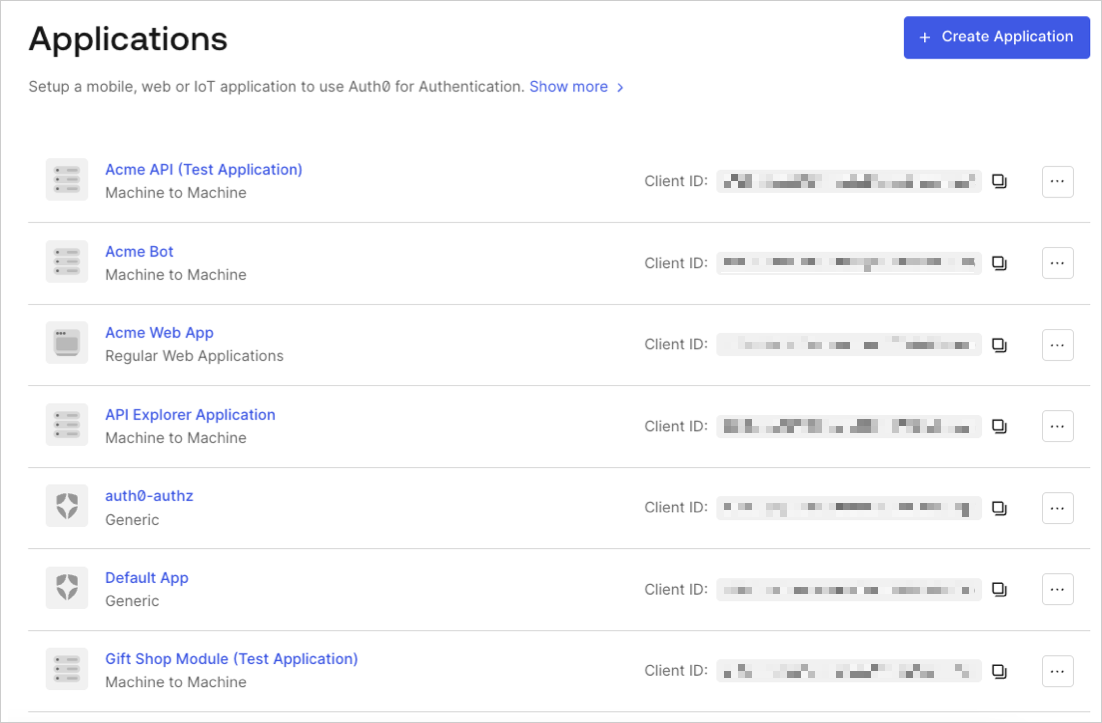
On the [Applications](https://manage.auth0.com/#/applications) page of the Dashboard, locate your application in the list, and click its name to view the available settings.
[Third-party applications](/docs/get-started/applications/third-party-applications) have a restricted set of configurable properties. Properties not in the supported set cannot be configured via the Auth0 Dashboard or Management API. To learn more, read [Security Controls for Third-Party Applications](/docs/get-started/applications/third-party-applications/security-controls#restricted-client-configuration).
 ## Basic settings
When you edit an existing application's settings or create a new application, you enter information about the application in the **Settings** view.
### Basic Information
## Basic settings
When you edit an existing application's settings or create a new application, you enter information about the application in the **Settings** view.
### Basic Information
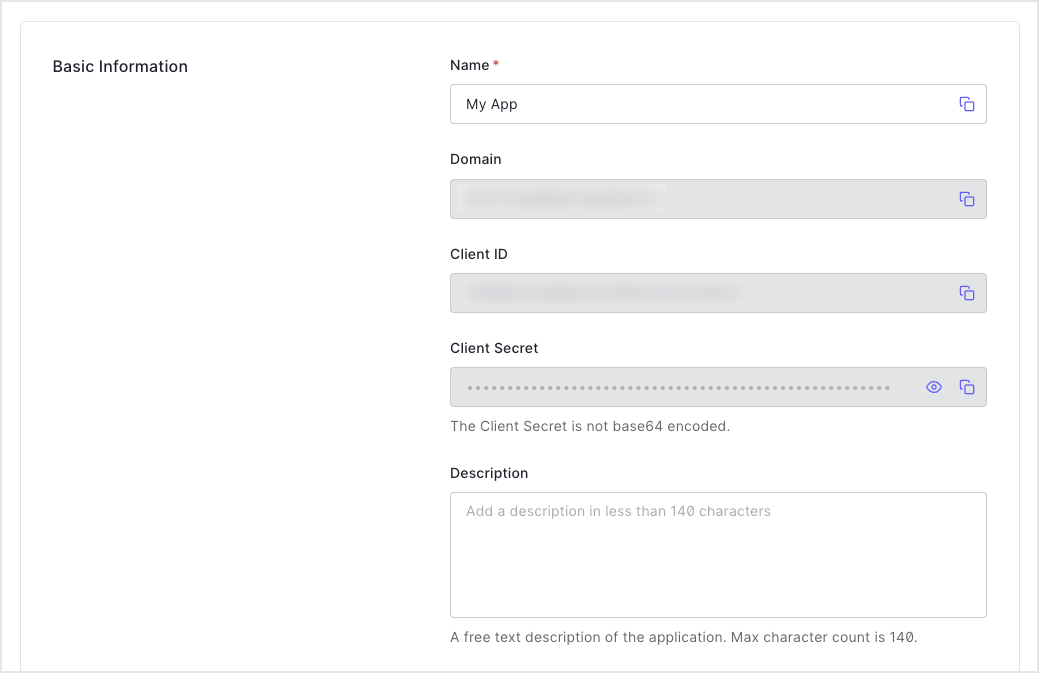 * **Name**: The name of your application. Editable, and will be seen in the portal, emails, logs, and so on.
* **Domain**: Your Auth0 tenant name. You choose this when you create a new Auth0 tenant, and it cannot be changed. If you need a different domain, you must register for a new tenant by selecting **+ Create Tenant** in the top-right menu.
* **Client ID**: The unique identifier for your application. You will use this when configuring authentication with Auth0. Generated by the system when you create a new application and cannot be modified.
* **Client Secret**: A string used to sign and validate ID Tokens for authentication flows and to gain access to select Auth0 API endpoints. By default, the value is hidden, so check the **Reveal Client Secret** box to see it. While the Client ID is considered public information, the Client Secret **must be kept confidential**. If anyone can access your Client Secret, they can issue tokens and access resources they shouldn't be able to access.
* **Description**: A free-text description of the Application's purpose. Maximum of 140 characters.
### Application Properties
* **Name**: The name of your application. Editable, and will be seen in the portal, emails, logs, and so on.
* **Domain**: Your Auth0 tenant name. You choose this when you create a new Auth0 tenant, and it cannot be changed. If you need a different domain, you must register for a new tenant by selecting **+ Create Tenant** in the top-right menu.
* **Client ID**: The unique identifier for your application. You will use this when configuring authentication with Auth0. Generated by the system when you create a new application and cannot be modified.
* **Client Secret**: A string used to sign and validate ID Tokens for authentication flows and to gain access to select Auth0 API endpoints. By default, the value is hidden, so check the **Reveal Client Secret** box to see it. While the Client ID is considered public information, the Client Secret **must be kept confidential**. If anyone can access your Client Secret, they can issue tokens and access resources they shouldn't be able to access.
* **Description**: A free-text description of the Application's purpose. Maximum of 140 characters.
### Application Properties
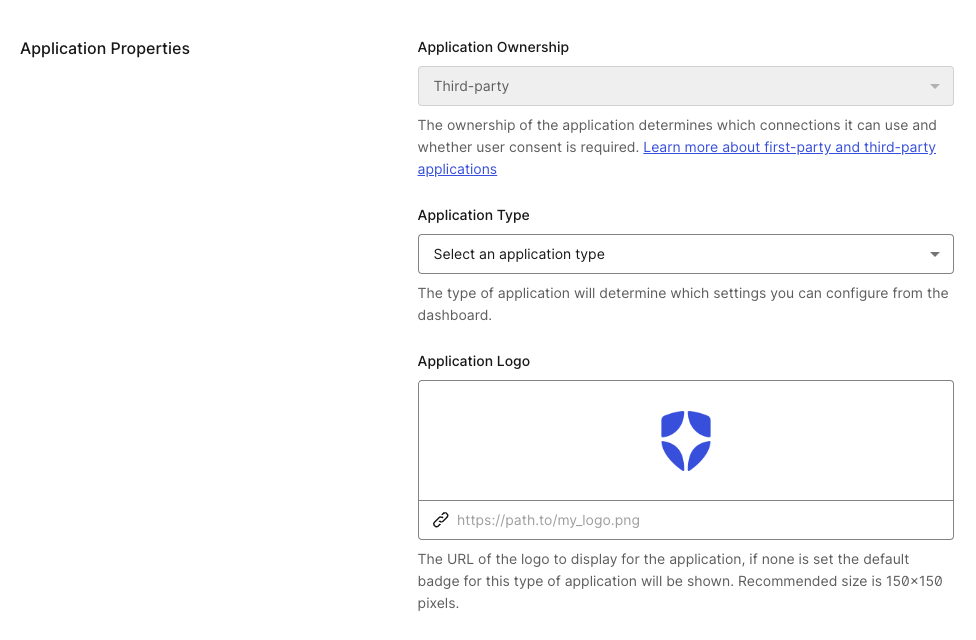 * **Application Logo**: The URL of a logo (recommended size: 150x150 pixels) to display for the application. Appears in several areas, including the list of applications in the Dashboard and customized consent forms. If none is set the default badge for this type of application will be shown.
* **Application Ownership**: Indicates whether the application is first-party or third-party. Third-party applications are subject to [enhanced security controls](/docs/get-started/applications/third-party-applications/security-controls). Application ownership is set at creation and cannot be changed. To learn more, read [First-Party and Third-Party Applications](/docs/get-started/applications/first-party-and-third-party-applications).
* **Application Type**: The Auth0 application type determines which settings you can configure using the Dashboard. (Not editable for M2M apps. Sometimes disabled for other Auth0 application types if the selected grant types are only allowed for the currently selected application type.) Use the drop-down to select from the following types:
* [Machine to Machine](/docs/get-started/auth0-overview/create-applications/machine-to-machine-apps): Non-interactive applications, such as command-line tools, daemons, IoT devices, or services running on your backend. Typically, you use this option if you have a service that requires access to an API.
* [Native App](/docs/get-started/auth0-overview/create-applications/native-apps): Mobile or Desktop applications that run natively in a device (such as iOS or Android).
* [Regular Web App](/docs/get-started/auth0-overview/create-applications/regular-web-apps): Traditional web apps that perform most of their application logic on the server (such as Express.js or ASP.NET).
* [Single Page App](/docs/get-started/auth0-overview/create-applications/single-page-web-apps): JavaScript apps that perform most of their user interface logic in a web browser, communicating with a web server primarily using APIs (such as AngularJS + Node.js or React).
### Application URIs
* **Application Logo**: The URL of a logo (recommended size: 150x150 pixels) to display for the application. Appears in several areas, including the list of applications in the Dashboard and customized consent forms. If none is set the default badge for this type of application will be shown.
* **Application Ownership**: Indicates whether the application is first-party or third-party. Third-party applications are subject to [enhanced security controls](/docs/get-started/applications/third-party-applications/security-controls). Application ownership is set at creation and cannot be changed. To learn more, read [First-Party and Third-Party Applications](/docs/get-started/applications/first-party-and-third-party-applications).
* **Application Type**: The Auth0 application type determines which settings you can configure using the Dashboard. (Not editable for M2M apps. Sometimes disabled for other Auth0 application types if the selected grant types are only allowed for the currently selected application type.) Use the drop-down to select from the following types:
* [Machine to Machine](/docs/get-started/auth0-overview/create-applications/machine-to-machine-apps): Non-interactive applications, such as command-line tools, daemons, IoT devices, or services running on your backend. Typically, you use this option if you have a service that requires access to an API.
* [Native App](/docs/get-started/auth0-overview/create-applications/native-apps): Mobile or Desktop applications that run natively in a device (such as iOS or Android).
* [Regular Web App](/docs/get-started/auth0-overview/create-applications/regular-web-apps): Traditional web apps that perform most of their application logic on the server (such as Express.js or ASP.NET).
* [Single Page App](/docs/get-started/auth0-overview/create-applications/single-page-web-apps): JavaScript apps that perform most of their user interface logic in a web browser, communicating with a web server primarily using APIs (such as AngularJS + Node.js or React).
### Application URIs
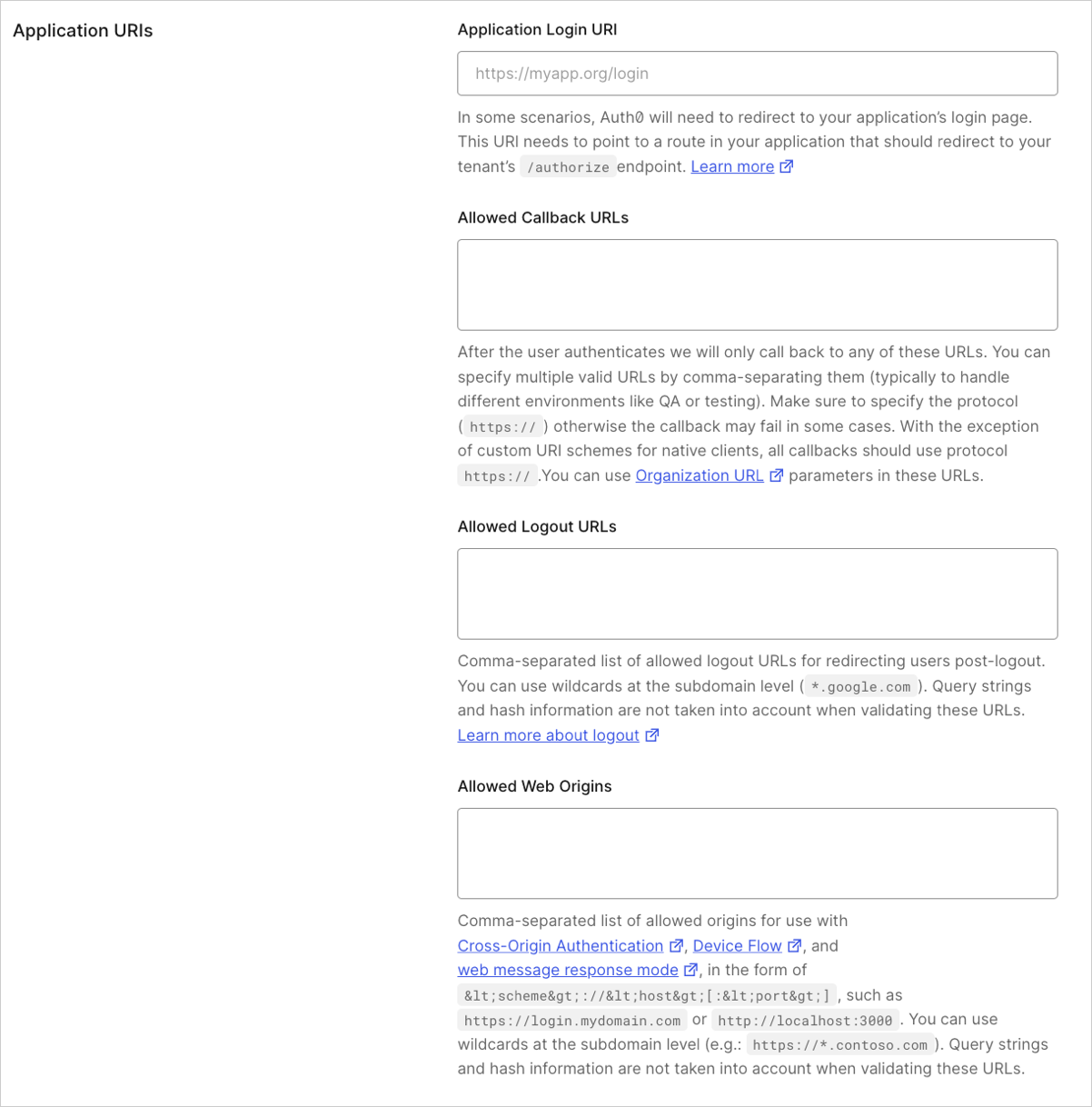 * **Application Login URI**: In some scenarios, Auth0 will need your application to redirect to your application's login page. This URI needs to point to a route in your application that redirects to your tenant's `/authorize` [endpoint](https://auth0.com/docs/api/authentication#authorize-application). It would usually take the form of `https://myapp.org/login`. You can use the following placeholders in this field:
* [**Organization metadata placeholders**](/docs/get-started/applications/wildcards-for-subdomains#organization-url-placeholders): Use `{organization.metadata.KEY}` to dynamically populate the URL based on metadata from the Auth0 Organization associated with the request (for example, `https://{organization.metadata.public_login_host}/login`).
* [**Custom Domain placeholders**](/docs/get-started/applications/wildcards-for-subdomains#custom-domain-url-placeholders): Use `{custom_domain.metadata.KEY}` to dynamically populate the URL based on metadata from the custom domain used in the request (for example, `https://{custom_domain.metadata.public_app_host}/login`).
To learn more, read [Configure Default Login Routes](/docs/authenticate/login/auth0-universal-login/configure-default-login-routes#dynamic-login-uris-with-metadata-placeholders).
* **Allowed Callback URLs**: Set of URLs to which Auth0 is allowed to redirect users after they authenticate. You can specify multiple valid URLs by comma-separating them (typically, to handle different environments like QA or testing). For production environments, verify that the URLs do not point to localhost. You can use the following placeholders in this field:
* [**Wildcards**](/docs/get-started/applications/wildcards-for-subdomains#wildcard-url-placeholders): Use `*` for subdomains (`*.google.com`) *Not recommended for production environments.*
* [**Organization placeholders**](/docs/get-started/applications/wildcards-for-subdomains#organization-url-placeholders): Use `{organization_name}` to dynamically specify a registered organization's name (for example, `https://{organization_name}.example.com`).
* [**Custom Domain placeholders**](/docs/get-started/applications/wildcards-for-subdomains#custom-domain-url-placeholders): Use `{custom.domain.metadata.KEY}` to dynamically populate the URL based on metadata from the custom domain used in the request (for example, `https://{custom_domain.metadata.public_app_url}/callback`).
The first URL listed in this field is taken as the default callback URL when the corresponding protocol flow does not explicitly specify one. This applies specifically to SAML, WS-Fed, and SAML IdP-initiated SSO flows.
Do not use wildcard placeholders or localhost URLs in your application callbacks or allowed origins fields. Using redirect URLs with wildcard placeholders can make your application vulnerable to attacks. To learn more, read [Unvalidated Redirects and Forwards Cheat Sheet on owasp.org](https://www.owasp.org/index.php/Unvalidated_Redirects_and_Forwards_Cheat_Sheet). Instead, URLs with the `{organization_name}` placeholder should be preferred, where relevant. To learn more, read [Subdomain URL Placeholders](/docs/get-started/applications/wildcards-for-subdomains).
* **Allowed Logout URLs**: After a user logs out from Auth0, you can redirect them with the `returnTo` query parameter. The URL that you use in `returnTo` must be listed here. You can specify multiple valid URLs by comma-separating them. For production environments, verify that the URLs do not point to localhost.
* [**Wildcards**](/docs/get-started/applications/wildcards-for-subdomains#wildcard-url-placeholders): Use `*` for subdomains (`*.google.com`) *Not recommended for production environments.*
* [**Custom Domain placeholders**](/docs/get-started/applications/wildcards-for-subdomains#custom-domain-url-placeholders): Use `{custom.domain.metadata.KEY}` to dynamically populate the URL based on metadata from the custom domain used in the request (for example, `https://{custom_domain.metadata.public_app_url}/callback`).
* **Allowed Web Origins**: List of URLs from where an authorization request using [Cross-Origin Authentication](/docs/authenticate/login/cross-origin-authentication), [Device Flow](/docs/get-started/authentication-and-authorization-flow/device-authorization-flow), and `web_message` as the response mode can originate from. You can specify multiple valid URLs by comma-separating them. For production environments, verify that the URLs do not point to localhost. Paths, query strings, and hash information are not taken into account when validating these URLs (and may, in fact, cause the match to fail). You can provide up to 100 URLs in the **Allowed Web Origins** field.
* [**Wildcards**](/docs/get-started/applications/wildcards-for-subdomains#wildcard-url-placeholders): Use `*` for subdomains (`*.google.com`) *Not recommended for production environments.*
* [**Custom Domain placeholders**](/docs/get-started/applications/wildcards-for-subdomains#custom-domain-url-placeholders): Use `{custom.domain.metadata.KEY`} to dynamically populate the URL based on metadata from the custom domain used in the request (for example, `https://{custom_domain.metadata.public_app_url}/callback`).
* **Allowed Origins (CORS)**: List of URLs that are allowed to make Cross-Origin Resource Sharing (CORS) requests to Auth0.
* [**Custom Domain placeholders**](/docs/get-started/applications/wildcards-for-subdomains#custom-domain-url-placeholders): Use `{custom.domain.metadata.KEY}` to dynamically populate the URL based on metadata from the custom domain used in the request (for example, `https://{custom_domain.metadata.public_app_url}/callback`).
If you configure your Application URLs exclusively using Custom Domain placeholders, authentication requests made via your tenant's canonical domain (for example, [https://your-tenant.us.auth0.com](https://your-tenant.us.auth0.com)) will fail.
This occurs because the canonical domain does not have the custom metadata required to resolve the placeholder. Ensure your application uses the specific Custom Domain for authentication, or provide a static fallback URL if canonical domain usage is required.
### ID Token
In the **ID Token** section, enter the **ID Token Expiration** (in seconds) which is the amount of time before the Auth0 `id_token` expires. The default value is 36000 seconds which is 10 hours.
**Use Auth0 instead of the IdP to do Single Sign-on**: If enabled, this setting prevents Auth0 from redirecting authenticated users with valid sessions to the identity provider (such as Facebook or ADFS). **Legacy tenants only.**
### Refresh Token Rotation
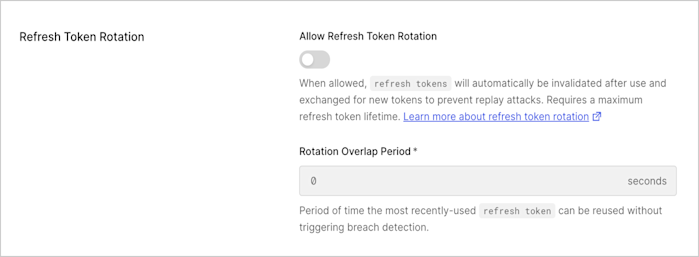
In the **Refresh Token Rotation** section, enable or disable rotation. When enabled, as a result of exchanging a refresh token, a new refresh token will be issued and the existing token will be invalidated. This allows for automatic detection of token reuse if the token is leaked. In addition, enter the **Rotation Overlap Period** (in seconds). This interval is the allowable leeway time that the same `refresh_token` can be used to request an `access_token` without triggering automatic reuse detection. To learn more, read [Refresh Token Rotation](/docs/secure/tokens/refresh-tokens/refresh-token-rotation).
* **Application Login URI**: In some scenarios, Auth0 will need your application to redirect to your application's login page. This URI needs to point to a route in your application that redirects to your tenant's `/authorize` [endpoint](https://auth0.com/docs/api/authentication#authorize-application). It would usually take the form of `https://myapp.org/login`. You can use the following placeholders in this field:
* [**Organization metadata placeholders**](/docs/get-started/applications/wildcards-for-subdomains#organization-url-placeholders): Use `{organization.metadata.KEY}` to dynamically populate the URL based on metadata from the Auth0 Organization associated with the request (for example, `https://{organization.metadata.public_login_host}/login`).
* [**Custom Domain placeholders**](/docs/get-started/applications/wildcards-for-subdomains#custom-domain-url-placeholders): Use `{custom_domain.metadata.KEY}` to dynamically populate the URL based on metadata from the custom domain used in the request (for example, `https://{custom_domain.metadata.public_app_host}/login`).
To learn more, read [Configure Default Login Routes](/docs/authenticate/login/auth0-universal-login/configure-default-login-routes#dynamic-login-uris-with-metadata-placeholders).
* **Allowed Callback URLs**: Set of URLs to which Auth0 is allowed to redirect users after they authenticate. You can specify multiple valid URLs by comma-separating them (typically, to handle different environments like QA or testing). For production environments, verify that the URLs do not point to localhost. You can use the following placeholders in this field:
* [**Wildcards**](/docs/get-started/applications/wildcards-for-subdomains#wildcard-url-placeholders): Use `*` for subdomains (`*.google.com`) *Not recommended for production environments.*
* [**Organization placeholders**](/docs/get-started/applications/wildcards-for-subdomains#organization-url-placeholders): Use `{organization_name}` to dynamically specify a registered organization's name (for example, `https://{organization_name}.example.com`).
* [**Custom Domain placeholders**](/docs/get-started/applications/wildcards-for-subdomains#custom-domain-url-placeholders): Use `{custom.domain.metadata.KEY}` to dynamically populate the URL based on metadata from the custom domain used in the request (for example, `https://{custom_domain.metadata.public_app_url}/callback`).
The first URL listed in this field is taken as the default callback URL when the corresponding protocol flow does not explicitly specify one. This applies specifically to SAML, WS-Fed, and SAML IdP-initiated SSO flows.
Do not use wildcard placeholders or localhost URLs in your application callbacks or allowed origins fields. Using redirect URLs with wildcard placeholders can make your application vulnerable to attacks. To learn more, read [Unvalidated Redirects and Forwards Cheat Sheet on owasp.org](https://www.owasp.org/index.php/Unvalidated_Redirects_and_Forwards_Cheat_Sheet). Instead, URLs with the `{organization_name}` placeholder should be preferred, where relevant. To learn more, read [Subdomain URL Placeholders](/docs/get-started/applications/wildcards-for-subdomains).
* **Allowed Logout URLs**: After a user logs out from Auth0, you can redirect them with the `returnTo` query parameter. The URL that you use in `returnTo` must be listed here. You can specify multiple valid URLs by comma-separating them. For production environments, verify that the URLs do not point to localhost.
* [**Wildcards**](/docs/get-started/applications/wildcards-for-subdomains#wildcard-url-placeholders): Use `*` for subdomains (`*.google.com`) *Not recommended for production environments.*
* [**Custom Domain placeholders**](/docs/get-started/applications/wildcards-for-subdomains#custom-domain-url-placeholders): Use `{custom.domain.metadata.KEY}` to dynamically populate the URL based on metadata from the custom domain used in the request (for example, `https://{custom_domain.metadata.public_app_url}/callback`).
* **Allowed Web Origins**: List of URLs from where an authorization request using [Cross-Origin Authentication](/docs/authenticate/login/cross-origin-authentication), [Device Flow](/docs/get-started/authentication-and-authorization-flow/device-authorization-flow), and `web_message` as the response mode can originate from. You can specify multiple valid URLs by comma-separating them. For production environments, verify that the URLs do not point to localhost. Paths, query strings, and hash information are not taken into account when validating these URLs (and may, in fact, cause the match to fail). You can provide up to 100 URLs in the **Allowed Web Origins** field.
* [**Wildcards**](/docs/get-started/applications/wildcards-for-subdomains#wildcard-url-placeholders): Use `*` for subdomains (`*.google.com`) *Not recommended for production environments.*
* [**Custom Domain placeholders**](/docs/get-started/applications/wildcards-for-subdomains#custom-domain-url-placeholders): Use `{custom.domain.metadata.KEY`} to dynamically populate the URL based on metadata from the custom domain used in the request (for example, `https://{custom_domain.metadata.public_app_url}/callback`).
* **Allowed Origins (CORS)**: List of URLs that are allowed to make Cross-Origin Resource Sharing (CORS) requests to Auth0.
* [**Custom Domain placeholders**](/docs/get-started/applications/wildcards-for-subdomains#custom-domain-url-placeholders): Use `{custom.domain.metadata.KEY}` to dynamically populate the URL based on metadata from the custom domain used in the request (for example, `https://{custom_domain.metadata.public_app_url}/callback`).
If you configure your Application URLs exclusively using Custom Domain placeholders, authentication requests made via your tenant's canonical domain (for example, [https://your-tenant.us.auth0.com](https://your-tenant.us.auth0.com)) will fail.
This occurs because the canonical domain does not have the custom metadata required to resolve the placeholder. Ensure your application uses the specific Custom Domain for authentication, or provide a static fallback URL if canonical domain usage is required.
### ID Token
In the **ID Token** section, enter the **ID Token Expiration** (in seconds) which is the amount of time before the Auth0 `id_token` expires. The default value is 36000 seconds which is 10 hours.
**Use Auth0 instead of the IdP to do Single Sign-on**: If enabled, this setting prevents Auth0 from redirecting authenticated users with valid sessions to the identity provider (such as Facebook or ADFS). **Legacy tenants only.**
### Refresh Token Rotation
In the **Refresh Token Rotation** section, enable or disable rotation. When enabled, as a result of exchanging a refresh token, a new refresh token will be issued and the existing token will be invalidated. This allows for automatic detection of token reuse if the token is leaked. In addition, enter the **Rotation Overlap Period** (in seconds). This interval is the allowable leeway time that the same `refresh_token` can be used to request an `access_token` without triggering automatic reuse detection. To learn more, read [Refresh Token Rotation](/docs/secure/tokens/refresh-tokens/refresh-token-rotation).
 ### Refresh Token Expiration
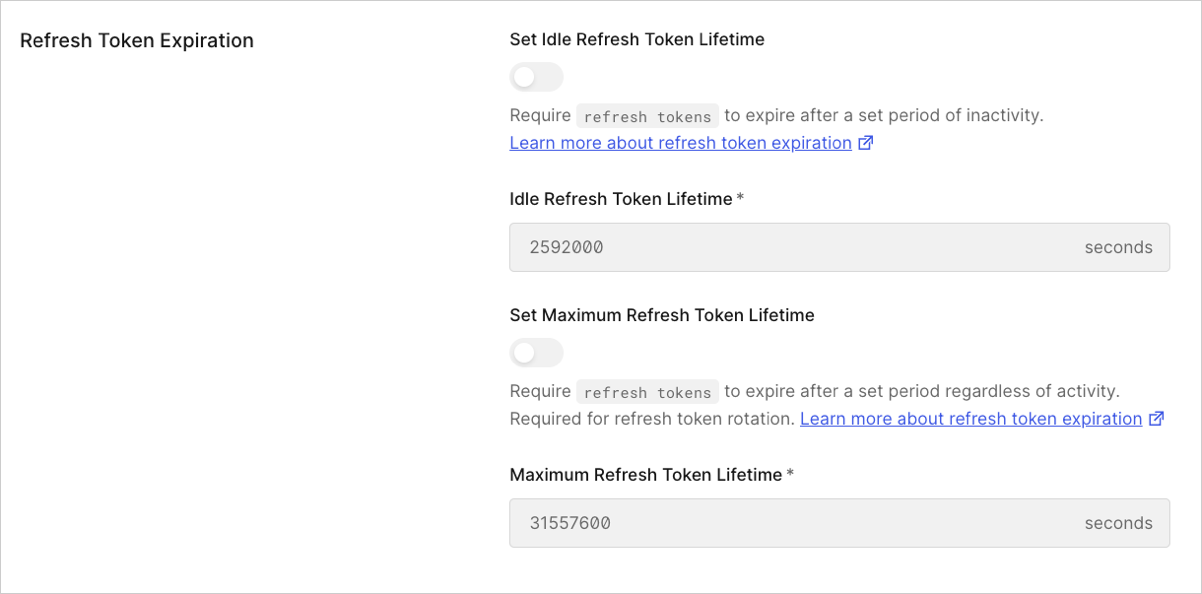
In the **Refresh Token Expiration** section, enable or disable absolute and inactivity expiration and set the lifetimes (in seconds) for each. To learn more, read [Configure Refresh Token Expiration](/docs/secure/tokens/refresh-tokens/configure-refresh-token-expiration).
### Refresh Token Expiration
In the **Refresh Token Expiration** section, enable or disable absolute and inactivity expiration and set the lifetimes (in seconds) for each. To learn more, read [Configure Refresh Token Expiration](/docs/secure/tokens/refresh-tokens/configure-refresh-token-expiration).
 ### Open Redirect Protection
Controls how Auth0 handles redirects for third-party applications. This setting is only available for third-party applications with enhanced security controls.
### Open Redirect Protection
Controls how Auth0 handles redirects for third-party applications. This setting is only available for third-party applications with enhanced security controls.
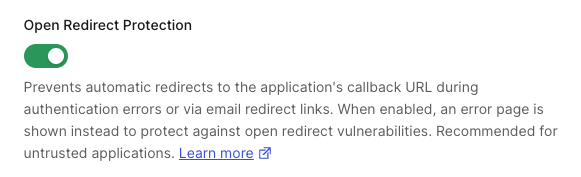 When enabled (default for third-party apps), Auth0 does not redirect to the application's callback URL on authentication errors and does not expose `application.callback_domain` in email templates. This prevents open redirect attacks when the redirect URI is controlled by an untrusted party.
Only disable open redirect protection for third-party applications where the configured callback URIs are trusted.
To learn more, read [Redirect Protection](/docs/get-started/applications/third-party-applications/security-controls#redirect-protection).
## Advanced settings
The **Advanced Settings** section allows you to:
* Manage or add application metadata, device, OAuth, and WS-Federation settings
* Obtain certificates and Token endpoint information
* Set the grant type(s) for the application
### Application Metadata
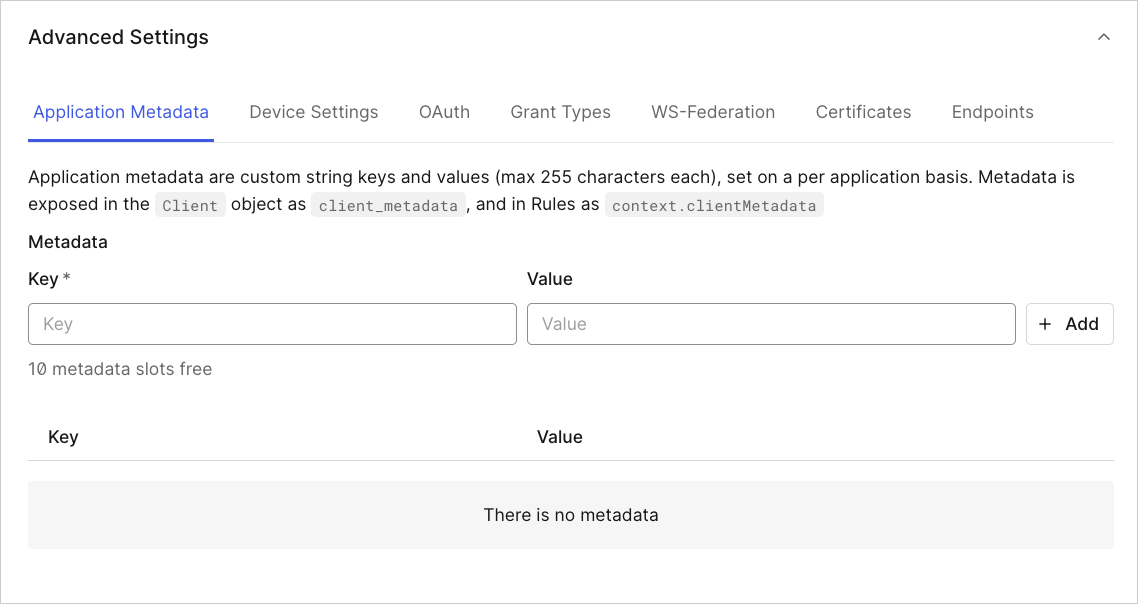
Application metadata are custom string keys and values (each of which has a character maximum of 255), set on a per-application basis. Metadata is exposed in the application object as `client_metadata`, and in rules as `context.clientMetadata`. You can create up to 10 sets of metadata.
When enabled (default for third-party apps), Auth0 does not redirect to the application's callback URL on authentication errors and does not expose `application.callback_domain` in email templates. This prevents open redirect attacks when the redirect URI is controlled by an untrusted party.
Only disable open redirect protection for third-party applications where the configured callback URIs are trusted.
To learn more, read [Redirect Protection](/docs/get-started/applications/third-party-applications/security-controls#redirect-protection).
## Advanced settings
The **Advanced Settings** section allows you to:
* Manage or add application metadata, device, OAuth, and WS-Federation settings
* Obtain certificates and Token endpoint information
* Set the grant type(s) for the application
### Application Metadata
Application metadata are custom string keys and values (each of which has a character maximum of 255), set on a per-application basis. Metadata is exposed in the application object as `client_metadata`, and in rules as `context.clientMetadata`. You can create up to 10 sets of metadata.
 ### Device Settings
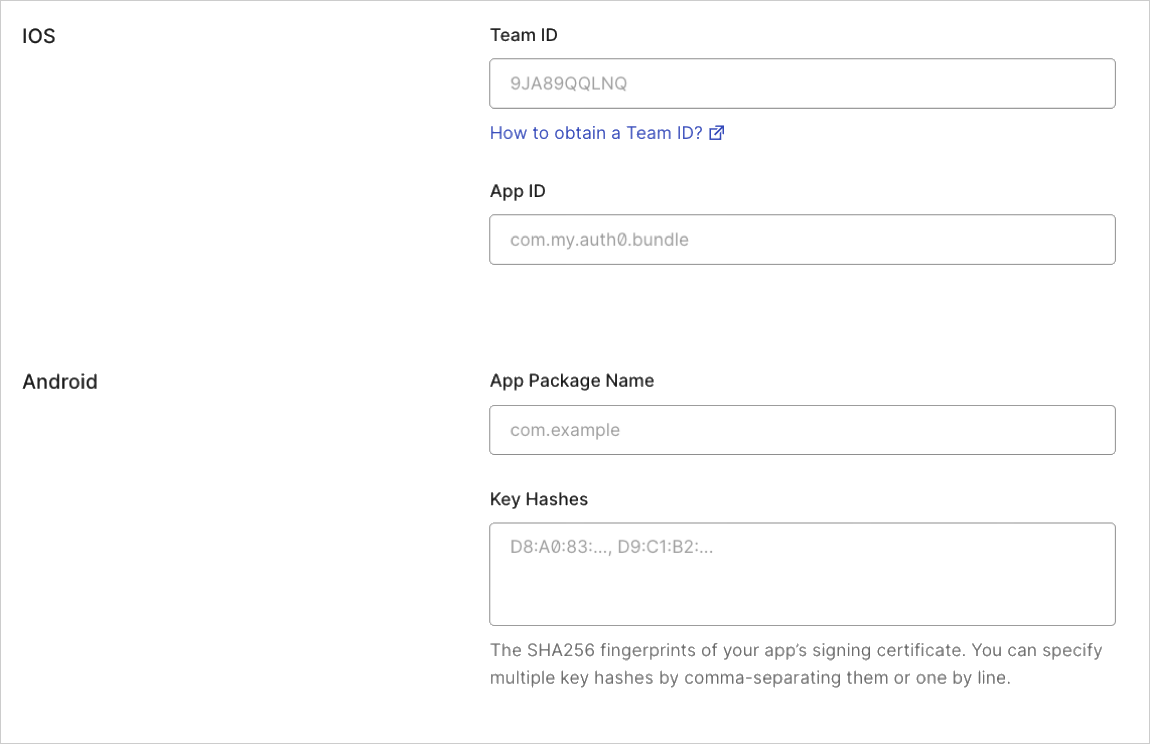
If you're developing a mobile application, enter the necessary iOS/Android parameters.
* When developing iOS apps, you'll provide your **Team ID** and **App ID**. To learn more, read [Enable Universal Links Support in Apple Xcode](/docs/get-started/applications/enable-universal-links-support-in-apple-xcode).
* When developing Android apps, you'll provide your **App Package Name** and your **Key Hashes**. To learn more, read [Enable Android App Links Support](/docs/get-started/applications/enable-android-app-links-support).
### Device Settings
If you're developing a mobile application, enter the necessary iOS/Android parameters.
* When developing iOS apps, you'll provide your **Team ID** and **App ID**. To learn more, read [Enable Universal Links Support in Apple Xcode](/docs/get-started/applications/enable-universal-links-support-in-apple-xcode).
* When developing Android apps, you'll provide your **App Package Name** and your **Key Hashes**. To learn more, read [Enable Android App Links Support](/docs/get-started/applications/enable-android-app-links-support).
 ### OAuth
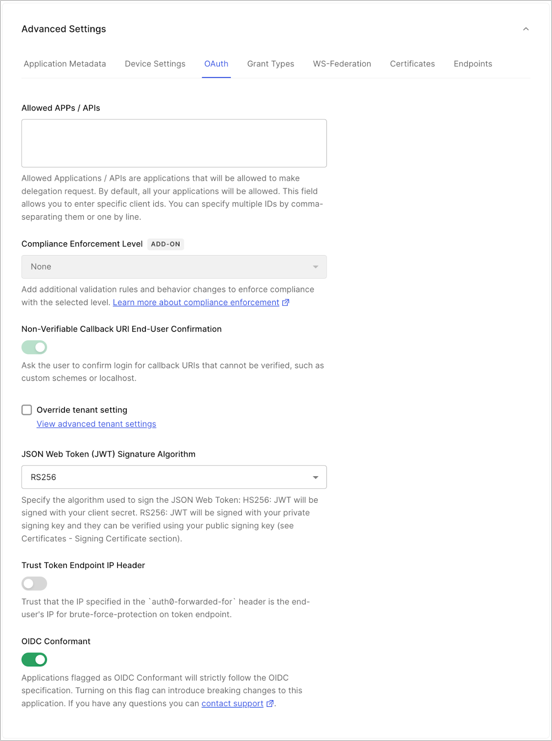 * By default, all apps/APIs can make a delegation request, but if you want to explicitly grant permissions to selected apps/APIs, you can do so in **Allowed Apps/APIs**.
* For customers using the Highly Regulated Identity add-on, use the **Compliance Enforcement Level** setting to set your level of compliance. For more information, review [Configure FAPI Compliance](/docs/get-started/applications/configure-fapi-compliance).
* **Non-Verifiable Callback URI End-User Confirmation**: Use this setting to control whether the user is prompted to confirm login when a Non-verifiable URI is used as callback. Auth0 recommends that you do not skip end-user confirmation in these cases. This setting takes precedence over the tenant setting with the same name. To learn more, read [Measures Against Application Impersonation](/docs/secure/security-guidance/measures-against-app-impersonation.mdx).
* Set the algorithm used ([**HS256**](https://en.wikipedia.org/wiki/Symmetric-key_algorithm) or [**RS256**](https://en.wikipedia.org/wiki/Public-key_cryptography)) for signing your JSON web tokens. To learn more, read [JSON Web Token Signing Algorithms](/docs/get-started/applications/signing-algorithms). When selecting `RS256` (recommended), the token will be signed with your tenant's private key.
* Toggle the **Trust Token Endpoint IP Header** setting; if this is enabled, the `auth0-forwarded-for` is set as trusted and used as a source of end user IP information for protection against brute-force attacks on the Token endpoint. This setting is only available for Regular Web Apps and M2M Apps.
* Toggle the switch to indicate if your application is **OIDC Conformant** or not. Applications flagged as OIDC Conformant will strictly follow the OIDC specification.
### Grant Types
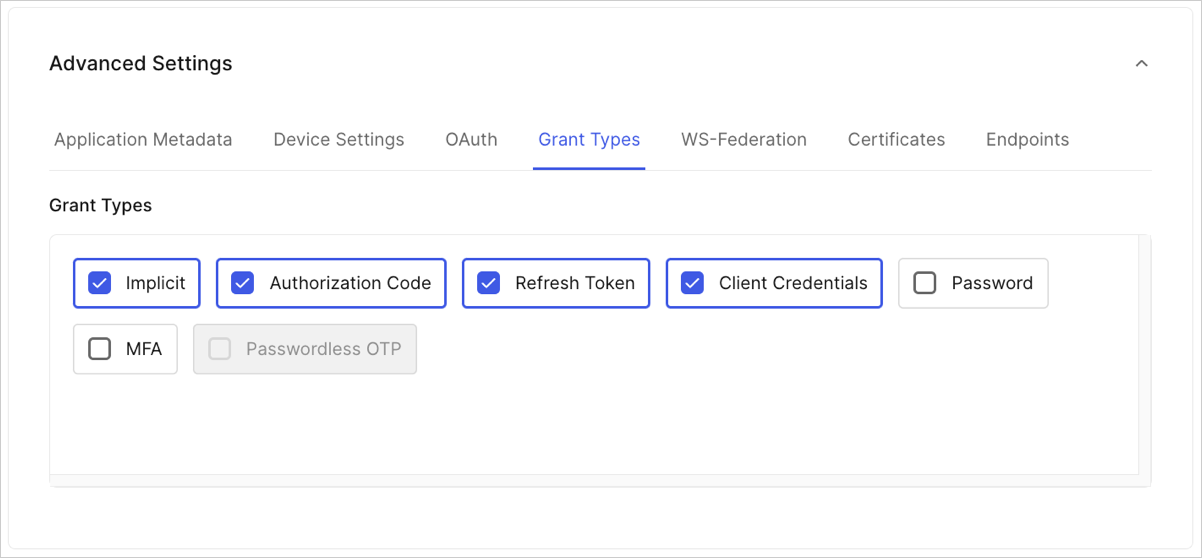
Select grant types to enable or disable for your application. Available grant types are based on the application type and [application ownership](/docs/get-started/applications/first-party-and-third-party-applications). Third-party applications with enhanced security controls support `authorization_code`, `refresh_token`, and `client_credentials`.
* By default, all apps/APIs can make a delegation request, but if you want to explicitly grant permissions to selected apps/APIs, you can do so in **Allowed Apps/APIs**.
* For customers using the Highly Regulated Identity add-on, use the **Compliance Enforcement Level** setting to set your level of compliance. For more information, review [Configure FAPI Compliance](/docs/get-started/applications/configure-fapi-compliance).
* **Non-Verifiable Callback URI End-User Confirmation**: Use this setting to control whether the user is prompted to confirm login when a Non-verifiable URI is used as callback. Auth0 recommends that you do not skip end-user confirmation in these cases. This setting takes precedence over the tenant setting with the same name. To learn more, read [Measures Against Application Impersonation](/docs/secure/security-guidance/measures-against-app-impersonation.mdx).
* Set the algorithm used ([**HS256**](https://en.wikipedia.org/wiki/Symmetric-key_algorithm) or [**RS256**](https://en.wikipedia.org/wiki/Public-key_cryptography)) for signing your JSON web tokens. To learn more, read [JSON Web Token Signing Algorithms](/docs/get-started/applications/signing-algorithms). When selecting `RS256` (recommended), the token will be signed with your tenant's private key.
* Toggle the **Trust Token Endpoint IP Header** setting; if this is enabled, the `auth0-forwarded-for` is set as trusted and used as a source of end user IP information for protection against brute-force attacks on the Token endpoint. This setting is only available for Regular Web Apps and M2M Apps.
* Toggle the switch to indicate if your application is **OIDC Conformant** or not. Applications flagged as OIDC Conformant will strictly follow the OIDC specification.
### Grant Types
Select grant types to enable or disable for your application. Available grant types are based on the application type and [application ownership](/docs/get-started/applications/first-party-and-third-party-applications). Third-party applications with enhanced security controls support `authorization_code`, `refresh_token`, and `client_credentials`.
 ### WS-Federation
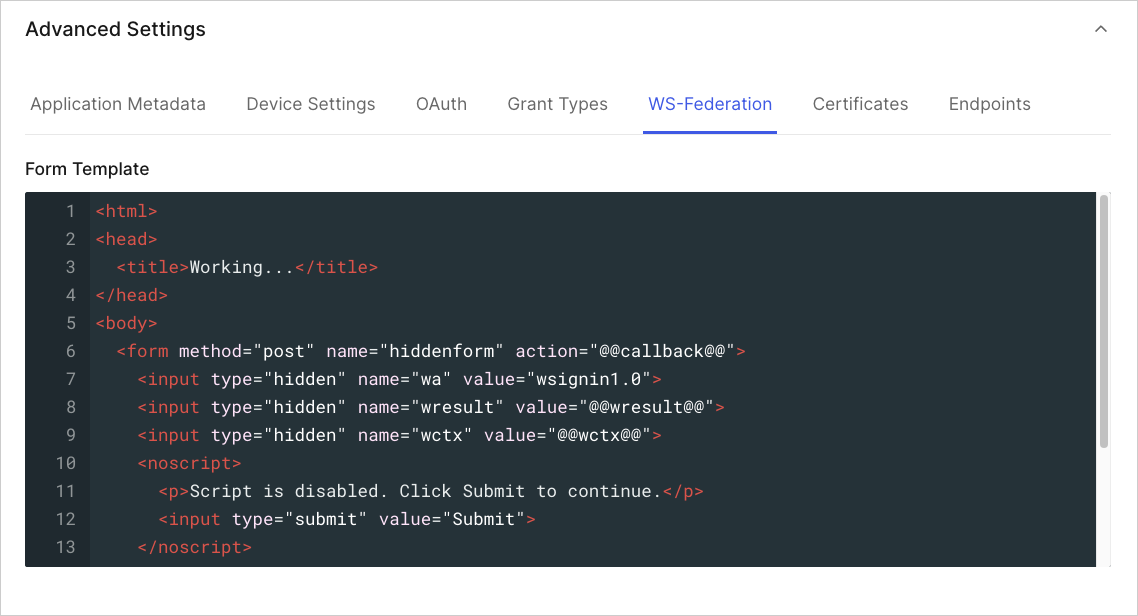
Manage or add WS-Federation settings.
### WS-Federation
Manage or add WS-Federation settings.
 ### Certificates
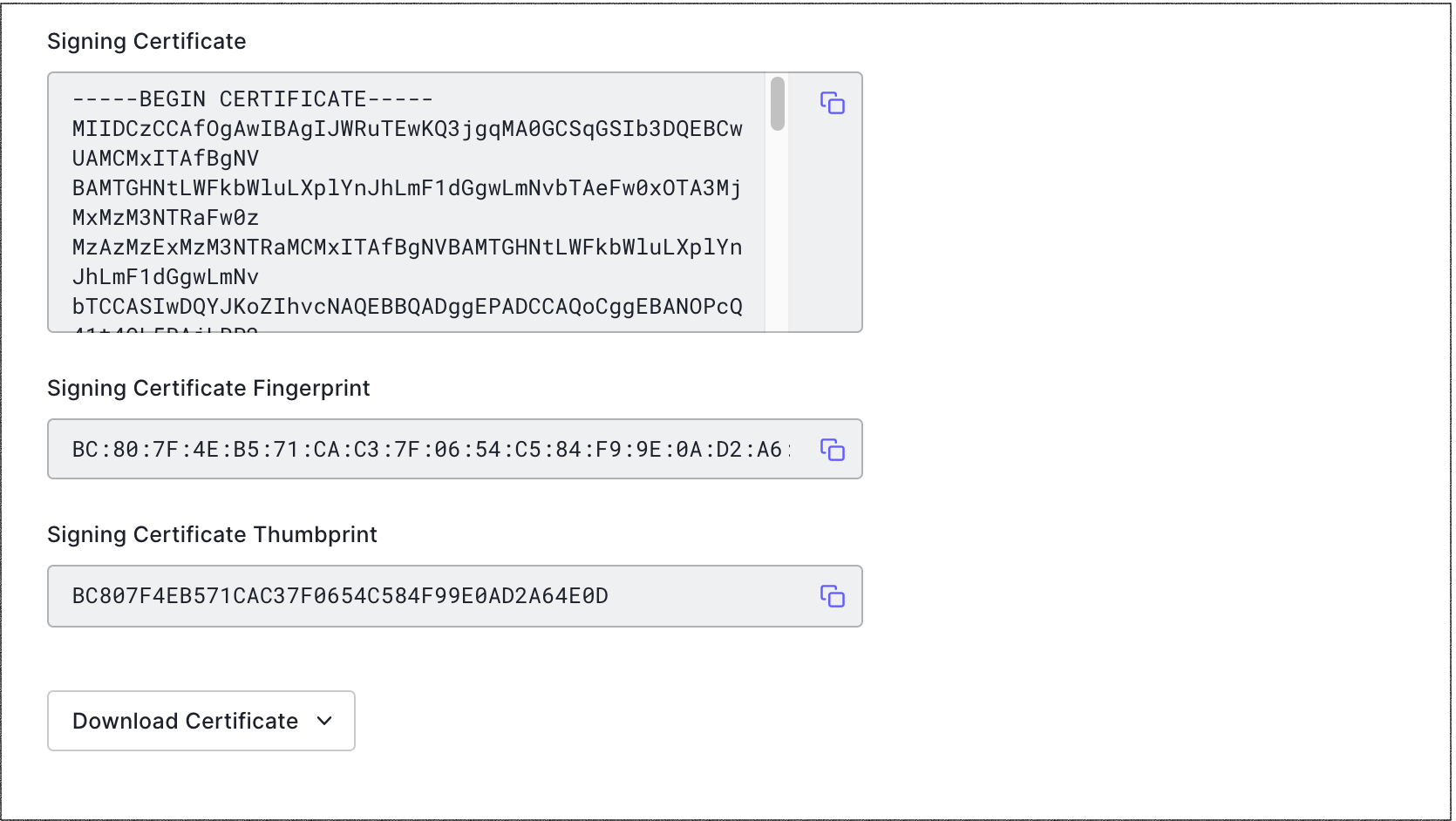
Manage or add the signing certificate, and its fingerprint and thumbprint.
### Certificates
Manage or add the signing certificate, and its fingerprint and thumbprint.
 ### Endpoints
View endpoint information for OAuth, SAML, and WS-Fed, such as Authorization and Metadata URLs.
## Learn more
* [Create Applications](/docs/get-started/auth0-overview/create-applications)
* [Remove Applications](/docs/get-started/applications/remove-applications)
* [Configure Applications with OIDC Discovery](/docs/get-started/applications/configure-applications-with-oidc-discovery)
* [Confidential and Public Applications](/docs/get-started/applications/confidential-and-public-applications)
* [First-Party and Third-Party Applications](/docs/get-started/applications/first-party-and-third-party-applications)
### Endpoints
View endpoint information for OAuth, SAML, and WS-Fed, such as Authorization and Metadata URLs.
## Learn more
* [Create Applications](/docs/get-started/auth0-overview/create-applications)
* [Remove Applications](/docs/get-started/applications/remove-applications)
* [Configure Applications with OIDC Discovery](/docs/get-started/applications/configure-applications-with-oidc-discovery)
* [Confidential and Public Applications](/docs/get-started/applications/confidential-and-public-applications)
* [First-Party and Third-Party Applications](/docs/get-started/applications/first-party-and-third-party-applications)