> ## Documentation Index
> Fetch the complete documentation index at: https://auth0-actions-triggers-prototype.mintlify.site/llms.txt
> Use this file to discover all available pages before exploring further.
# OrganizationSelection
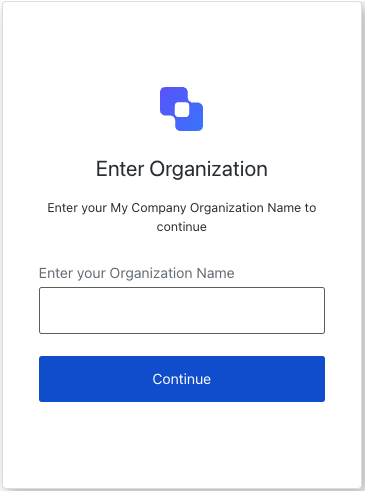
> Describes all the properties and methods available to customize the Universal Login `organization-selection` screen.
The OrganizationSelection class implements the `organization-selection` screen functionality. This screen allows users to select an organization to continue with.
 ## Constructors
Create an instance of OrganizationSelection screen manager:
```typescript Example theme={null}
import OrganizationSelection from '@auth0/auth0-acul-js/organization-selection';
const organizationSelectionManager = new OrganizationSelection();
await organizationSelectionManager.continueWithOrganizationName({
organizationName: 'testOrganizationName',
});
```
## Properties
BrandingMembers}>
Provides branding-related configurations, such as branding theme and settings.
ClientMembers}>
Provides client-related configurations, such as `id`, `name`, and `logoUrl`, for the `organization-selection` screen.
OrganizationMembers}>
Provides information about the user's Organization, such as `id` and `name`.
PromptMembers}>
Contains data about the current prompt in the authentication flow.
ScreenMembersOnOrganizationSelection}>
Contains details specific to the `organization-selection` screen, including its configuration and context.
TenantMembers}>
Contains data related to the tenant, such as `id` and associated metadata.
TransactionMembers}>
Provides transaction-specific data for the `organization-selection` screen, such as active identifiers and flow states.
UntrustedDataMembers}>
Handles untrusted data passed to the SDK, such as user input during the organization selection flow.
UserMembers}>
Details of the active user, including `username`, `email`, and `roles`.
## Methods
This method changes the display language of the Universal Login page.
```typescript Example theme={null}
import OrganizationSelection from '@auth0/auth0-acul-js/organization-selection';
const organizationSelectionManager = new OrganizationSelection();
organizationSelectionManager.changeLanguage({
language: 'fr',
});
```
**Method Parameters**
[LanguageChangeOptions](/docs/libraries/acul/js-sdk/Screens/interfaces/LanguageChangeOptions).
The locale code for the desired language (for example, `'en'`, `'fr'`, `'es'`).
When set to `'session'`, the selected language persists for the duration of the session.
This method continues with the selected organization name.
```typescript Example theme={null}
import OrganizationSelection from '@auth0/auth0-acul-js/organization-selection';
const organizationSelectionManager = new OrganizationSelection();
await organizationSelectionManager.continueWithOrganizationName({
organizationName: 'testOrganizationName',
});
```
**Method Parameters**
[ContinueWithOrganizationNameOptions](/docs/libraries/acul/js-sdk/Screens/interfaces/ContinueWithOrganizationNameOptions).
The name of the organization to continue with.
Error[]}>
This method retrieves the array of transaction errors from the context, or an empty array if none exist.
## Constructors
Create an instance of OrganizationSelection screen manager:
```typescript Example theme={null}
import OrganizationSelection from '@auth0/auth0-acul-js/organization-selection';
const organizationSelectionManager = new OrganizationSelection();
await organizationSelectionManager.continueWithOrganizationName({
organizationName: 'testOrganizationName',
});
```
## Properties
BrandingMembers}>
Provides branding-related configurations, such as branding theme and settings.
ClientMembers}>
Provides client-related configurations, such as `id`, `name`, and `logoUrl`, for the `organization-selection` screen.
OrganizationMembers}>
Provides information about the user's Organization, such as `id` and `name`.
PromptMembers}>
Contains data about the current prompt in the authentication flow.
ScreenMembersOnOrganizationSelection}>
Contains details specific to the `organization-selection` screen, including its configuration and context.
TenantMembers}>
Contains data related to the tenant, such as `id` and associated metadata.
TransactionMembers}>
Provides transaction-specific data for the `organization-selection` screen, such as active identifiers and flow states.
UntrustedDataMembers}>
Handles untrusted data passed to the SDK, such as user input during the organization selection flow.
UserMembers}>
Details of the active user, including `username`, `email`, and `roles`.
## Methods
This method changes the display language of the Universal Login page.
```typescript Example theme={null}
import OrganizationSelection from '@auth0/auth0-acul-js/organization-selection';
const organizationSelectionManager = new OrganizationSelection();
organizationSelectionManager.changeLanguage({
language: 'fr',
});
```
**Method Parameters**
[LanguageChangeOptions](/docs/libraries/acul/js-sdk/Screens/interfaces/LanguageChangeOptions).
The locale code for the desired language (for example, `'en'`, `'fr'`, `'es'`).
When set to `'session'`, the selected language persists for the duration of the session.
This method continues with the selected organization name.
```typescript Example theme={null}
import OrganizationSelection from '@auth0/auth0-acul-js/organization-selection';
const organizationSelectionManager = new OrganizationSelection();
await organizationSelectionManager.continueWithOrganizationName({
organizationName: 'testOrganizationName',
});
```
**Method Parameters**
[ContinueWithOrganizationNameOptions](/docs/libraries/acul/js-sdk/Screens/interfaces/ContinueWithOrganizationNameOptions).
The name of the organization to continue with.
Error[]}>
This method retrieves the array of transaction errors from the context, or an empty array if none exist.