> ## Documentation Index
> Fetch the complete documentation index at: https://auth0-actions-triggers-prototype.mintlify.site/llms.txt
> Use this file to discover all available pages before exploring further.
> Learn about Security Center, which provides observability tools that empower you to see potential attack trends and quickly respond to them in real-time.
# Security Center
Security Center provides observability tools that allow you to see potential attack trends and quickly respond to them in real-time. Security Center provides real-time monitoring that allows you to observe your own Customer Identity and Access Management (CIAM) anomaly detection metrics, and lets you configure attack mitigation features from within the same space.
## Real-time monitoring
Security Center provides you with an overview of your tenant’s security pulse and allows you to drive outcomes from within the Auth0 Management Dashboard. In Security Center, you can:
* Monitor your total traffic and total threats
* Observe threat behavior trends
* Identify applications associated with threat behavior trends
* Track login and signup traffic
* Monitor threats identified by our Attack Protection and MFA features
### Filtering and aggregation
Security Center allows you to filter available data to your needs.
You can filter data based on the following fields:
* Time period (up to the last 14 days)
* Applications
* Connections
Depending on the time period you select, the data is automatically aggregated per minute, per hour, or per day.
### Threat behavior trends
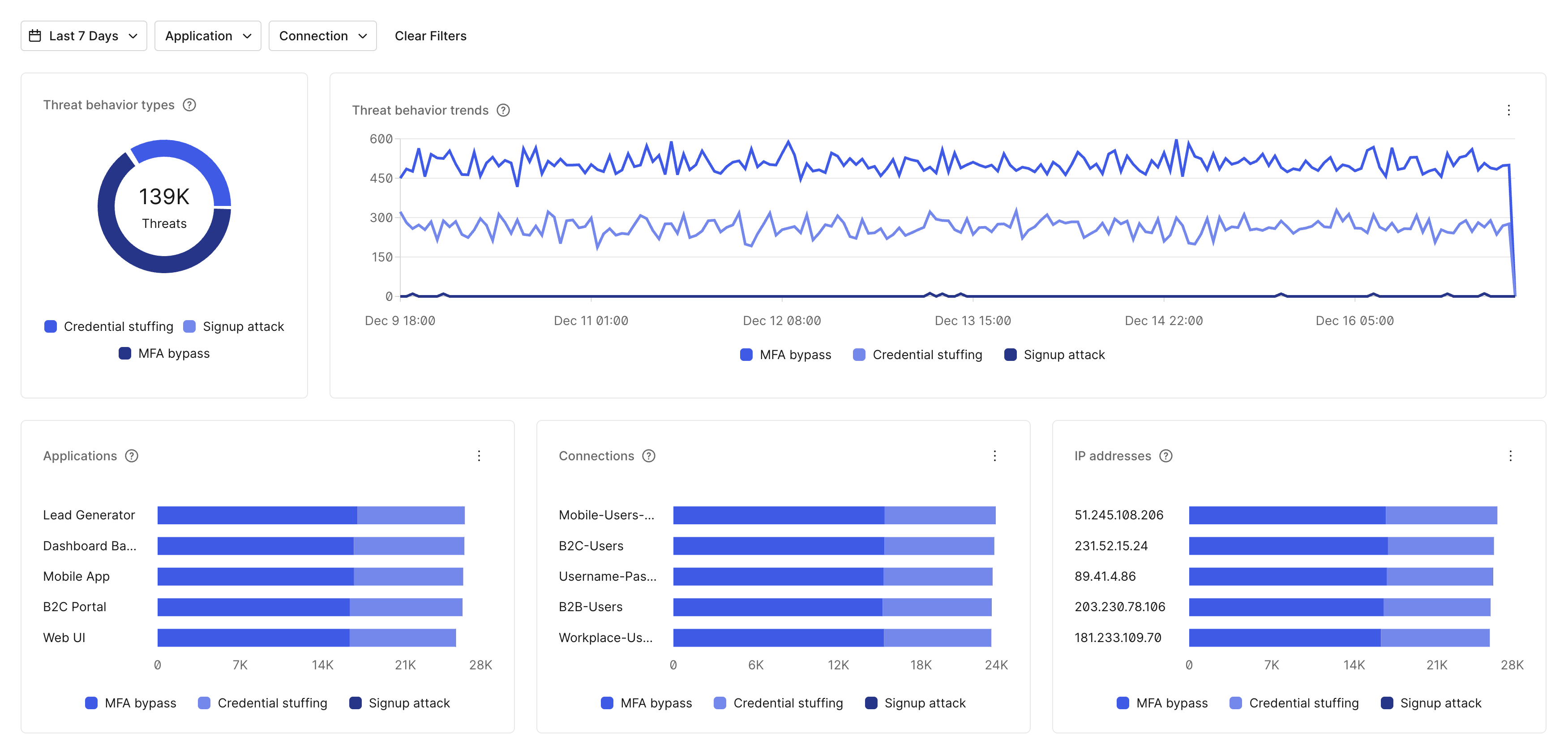
Security Center allows you to observe threat behavior trends for the following threat types:
* **Credential stuffing**: Behavioral patterns that appear to involve a machine attempt with the goal of submitting credentials to compromise user accounts.
* **Signup attack**: Behavioral patterns that appear to involve a machine attempt with the goal of creating new user accounts.
* **MFA bypass**: Behavior patterns that appear to involve a machine attempt with the goal of circumventing user multi-factor authentication (MFA) protections.
Views allow you to slice data by threat type and identify applications associated with threat behavior trends.
 ### Authentication events
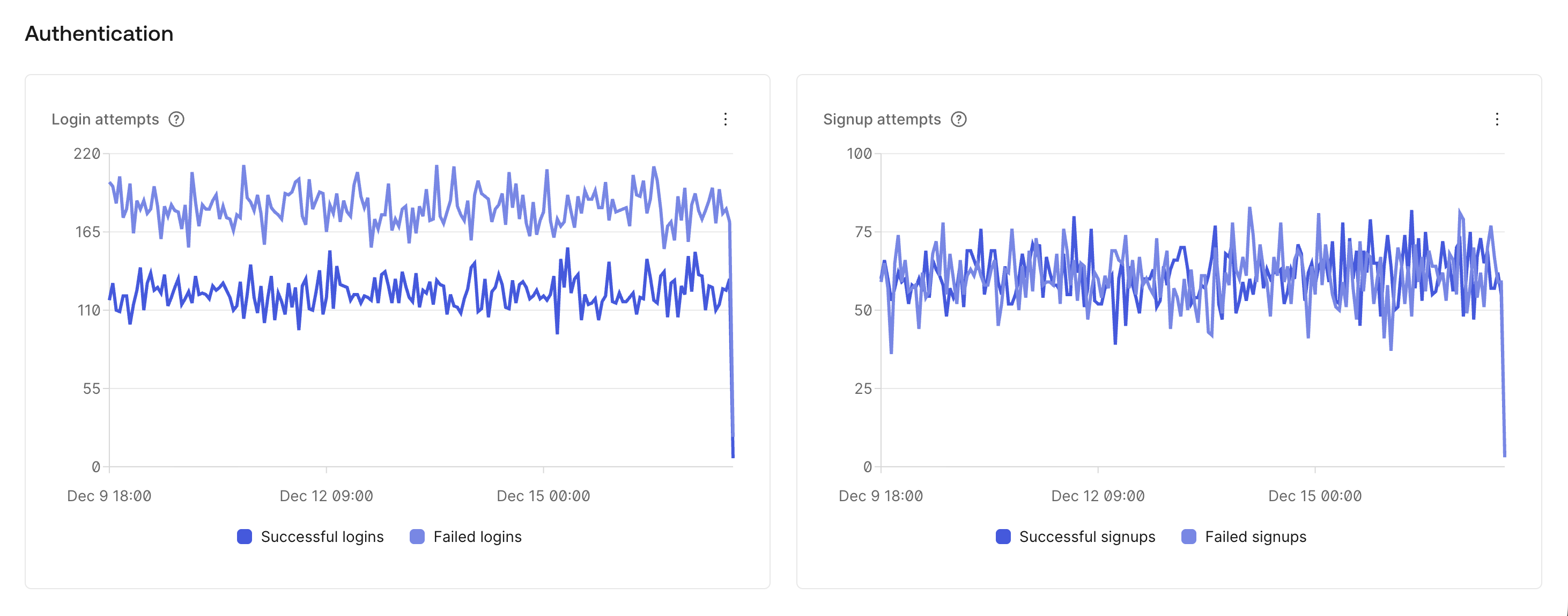
Security Center allows you to inspect authentication events, including login attempts and signup attempts.
### Authentication events
Security Center allows you to inspect authentication events, including login attempts and signup attempts.
 #### Login attempts
Login attempts include both successful and failed login transactions over the last seven days.
#### Signup attempts
Signup attempts include both successful and failed signup transactions over the last seven days.
### Attack Protection and MFA monitoring
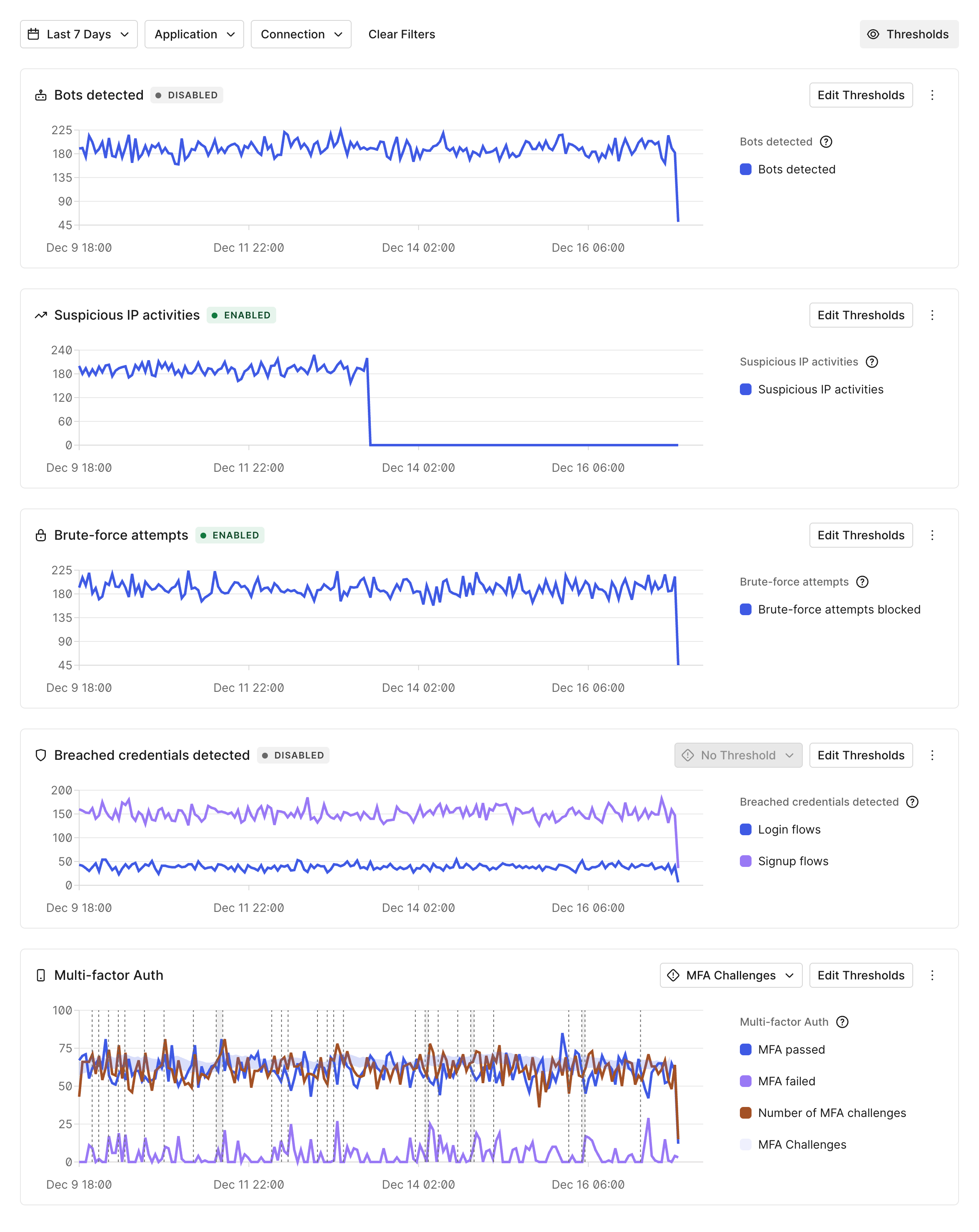
Security Center helps you understand current attack trends identified by our Attack Protection and MFA features, and allows you to implement countermeasures by enabling and configuring these features:
We will identify patterns that are usually an indicator of known attack types and log-related events, regardless of whether you selected countermeasures when configuring our Attack Protection features.
#### Login attempts
Login attempts include both successful and failed login transactions over the last seven days.
#### Signup attempts
Signup attempts include both successful and failed signup transactions over the last seven days.
### Attack Protection and MFA monitoring
Security Center helps you understand current attack trends identified by our Attack Protection and MFA features, and allows you to implement countermeasures by enabling and configuring these features:
We will identify patterns that are usually an indicator of known attack types and log-related events, regardless of whether you selected countermeasures when configuring our Attack Protection features.
 #### Bot detection
Bot detection mitigates scripted attacks by detecting when a request is likely to be coming from a bot. Bot detection includes the number of bots detected over the last seven days.
To learn more about this feature, read [Bot Detection](/docs/secure/attack-protection/bot-detection).
#### Suspicious IP throttling
Suspicious IP throttling blocks traffic from any IP address that rapidly attempts too many logins or signups. Suspicious IP throttling includes the number of suspicious IPs blocked over the last seven days.
To learn more about this feature, read [Suspicious IP Throttling](/docs/secure/attack-protection/suspicious-ip-throttling).
#### Brute-force protection
Brute-force protection safeguards against a single IP address attacking a single user account. Brute-force protection includes the number of blocked brute-force attempts over the last seven days.
To learn more about this feature, read [Brute-Force Protection](/docs/secure/attack-protection/brute-force-protection).
#### Breached password detection
Breached password detection protects your applications from bad actors signing up or logging in with stolen credentials. Breached password detection includes the number of breached credentials detected in login and signup flows over the last seven days.
To learn more about this feature, read [Breached Password Detection](/docs/secure/attack-protection/breached-password-detection).
#### Multi-factor authentication
Multi-factor authentication (MFA) verifies users by requiring more than one type of user validation. MFA includes the number of MFA challenges detected and the number of MFA challenges passed or failed over the last seven days.
To learn more about this feature, read [Multi-Factor Authentication](/docs/secure/multi-factor-authentication).
## Learn more
* [Metrics](/docs/secure/security-center/metrics)
#### Bot detection
Bot detection mitigates scripted attacks by detecting when a request is likely to be coming from a bot. Bot detection includes the number of bots detected over the last seven days.
To learn more about this feature, read [Bot Detection](/docs/secure/attack-protection/bot-detection).
#### Suspicious IP throttling
Suspicious IP throttling blocks traffic from any IP address that rapidly attempts too many logins or signups. Suspicious IP throttling includes the number of suspicious IPs blocked over the last seven days.
To learn more about this feature, read [Suspicious IP Throttling](/docs/secure/attack-protection/suspicious-ip-throttling).
#### Brute-force protection
Brute-force protection safeguards against a single IP address attacking a single user account. Brute-force protection includes the number of blocked brute-force attempts over the last seven days.
To learn more about this feature, read [Brute-Force Protection](/docs/secure/attack-protection/brute-force-protection).
#### Breached password detection
Breached password detection protects your applications from bad actors signing up or logging in with stolen credentials. Breached password detection includes the number of breached credentials detected in login and signup flows over the last seven days.
To learn more about this feature, read [Breached Password Detection](/docs/secure/attack-protection/breached-password-detection).
#### Multi-factor authentication
Multi-factor authentication (MFA) verifies users by requiring more than one type of user validation. MFA includes the number of MFA challenges detected and the number of MFA challenges passed or failed over the last seven days.
To learn more about this feature, read [Multi-Factor Authentication](/docs/secure/multi-factor-authentication).
## Learn more
* [Metrics](/docs/secure/security-center/metrics)