> ## Documentation Index
> Fetch the complete documentation index at: https://auth0-actions-triggers-prototype.mintlify.site/llms.txt
> Use this file to discover all available pages before exploring further.
# How to Configure Tenant Access Control List Rules
> Define a rule's signal, condition, action, scope, and priority to define its behavior. Use the Management API or Auth0's SDKs, CLIs, or Terraform provider to configure and manage the Tenant ACL.
A Tenant ACL rule is composed of the following elements:
* **Signal**: The signal is an identifying piece of information that is provided by the incoming request, such as IP address, geolocation, or user agent.
* **Condition**: The condition is the combination of an operator (such as `match`) and a set of values (such as a list of IP addresses).
* **Action**: The action is the directive that your rule executes if criteria are met, such as allow, block, or redirect.
* **Scope**: The scope indicates which sets of endpoints that the rule is enforced for, including the Authentication API, Management API, or your entire tenant.
* **Priority**: The priority defines the order in which the rule runs relative to other rules.
For detailed information about these Tenant ACL rule properties and how to use them, read the [Management API Endpoint Parameter Reference](./reference).
The Tenant ACL uses a consistent [rule evaluation logic](./rule-evaluation) to determine what action, if any, to apply to a given request.
Carefully assign priorities to create granular access control policies for your use case.
## Create and delete rules
You can create and delete Tenant ACL rules using the following Management API endpoints. You need a [Management API access token](/docs/secure/tokens/access-tokens/management-api-access-tokens/get-management-api-access-tokens-for-production) with indicated scopes.
| Action | Endpoint | Required scope |
| ------------- | -------------------------------------------------------------------------------------------- | --------------------- |
| Create a rule | [Create access control list](/docs/api/management/v2/network-acls/post-network-acls) | `create:network_acls` |
| Delete a rule | [Delete access control list](/docs/api/management/v2/network-acls/delete-network-acls-by-id) | `delete:network_acls` |
## Modify rules
You can modify Tenant ACL rules using the following Management API endpoints. You need a [Management API access token](/docs/secure/tokens/access-tokens/management-api-access-tokens/get-management-api-access-tokens-for-production) with indicated scopes.
| Action | Endpoint | Required scope |
| ---------------- | ---------------------------------------------------------------------------------------------------------- | --------------------- |
| Update a rule | [Partial update for an access control list](/docs/api/management/v2/network-acls/patch-network-acls-by-id) | `update:network_acls` |
| Overwrite a rule | [Update access control list](/docs/api/management/v2/network-acls/put-network-acls-by-id) | `update:network_acls` |
### Enable or disable rules
You can enable or disable a rule with the Management API [Update access control list](https://auth0.com/docs/api/management/v2/network-acls/put-network-acls-by-id) endpoint.
Set the `active` property of the `rule` object to `true` or false, respectively.
To enable or disable a rule using the Dashboard, go to [Dashboard > Security > Access Control](https://manage.auth0.com/#/security/access-control).
In the list of existing rules, you can enable or disable specific rules by toggling the button next to them.
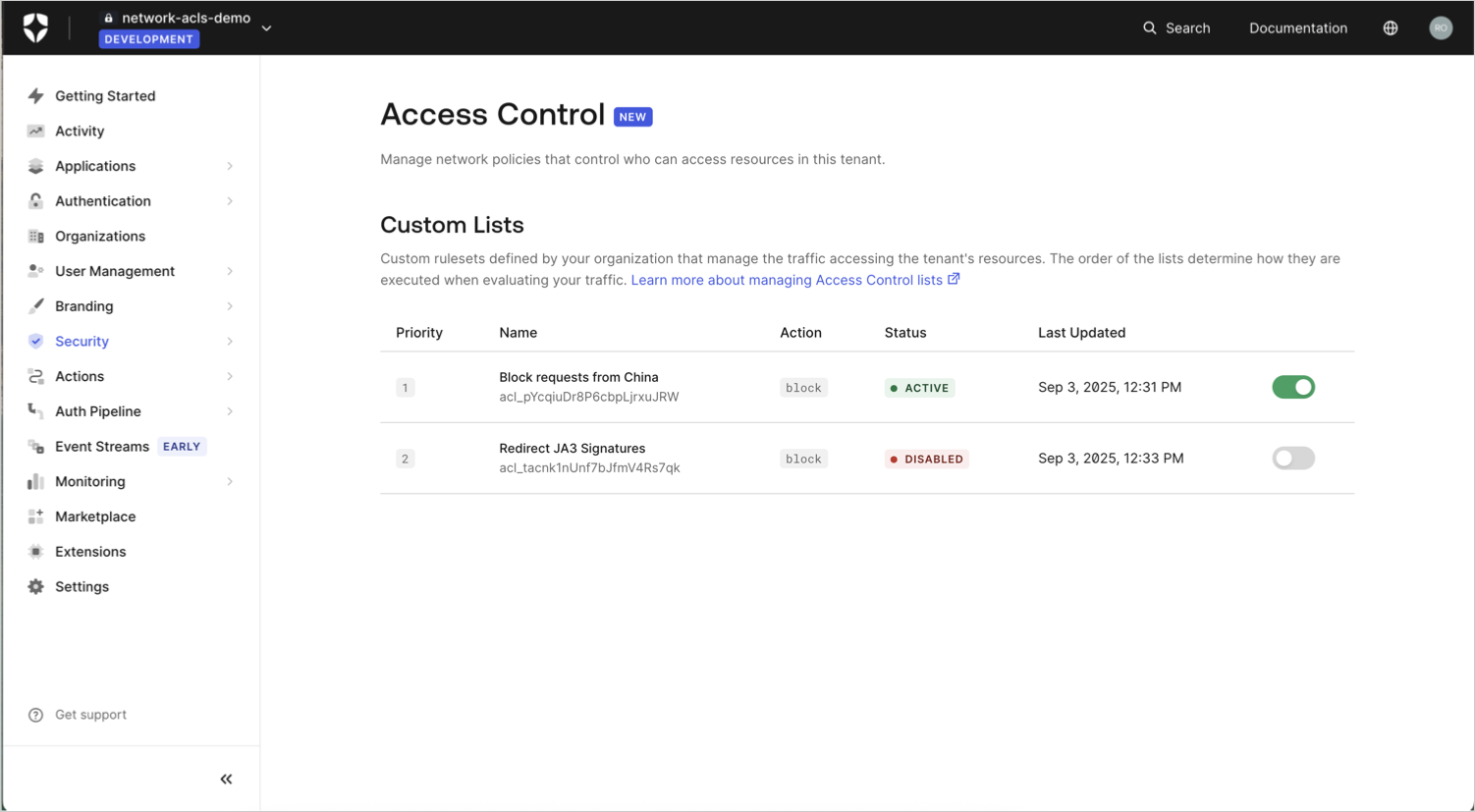 The **Status** column displays the status of the rule (**Active** or **Disabled**).
## View rules
You can view existing Tenant ACL rules using the following Management API endpoints. You need a [Management API access token](/docs/secure/tokens/access-tokens/management-api-access-tokens/get-management-api-access-tokens-for-production) with indicated scopes.
| Action | Endpoint | Required scope |
| -------------- | -------------------------------------------------------------------------------------------------------------------- | ------------------- |
| View a rule | [Get a specific access control list entry for a tenant](/docs/api/management/v2/network-acls/get-network-acls-by-id) | `read:network_acls` |
| View all rules | [Get all access control list entries for a tenant](/docs/api/management/v2/network-acls/get-network-acls) | `read:network_acls` |
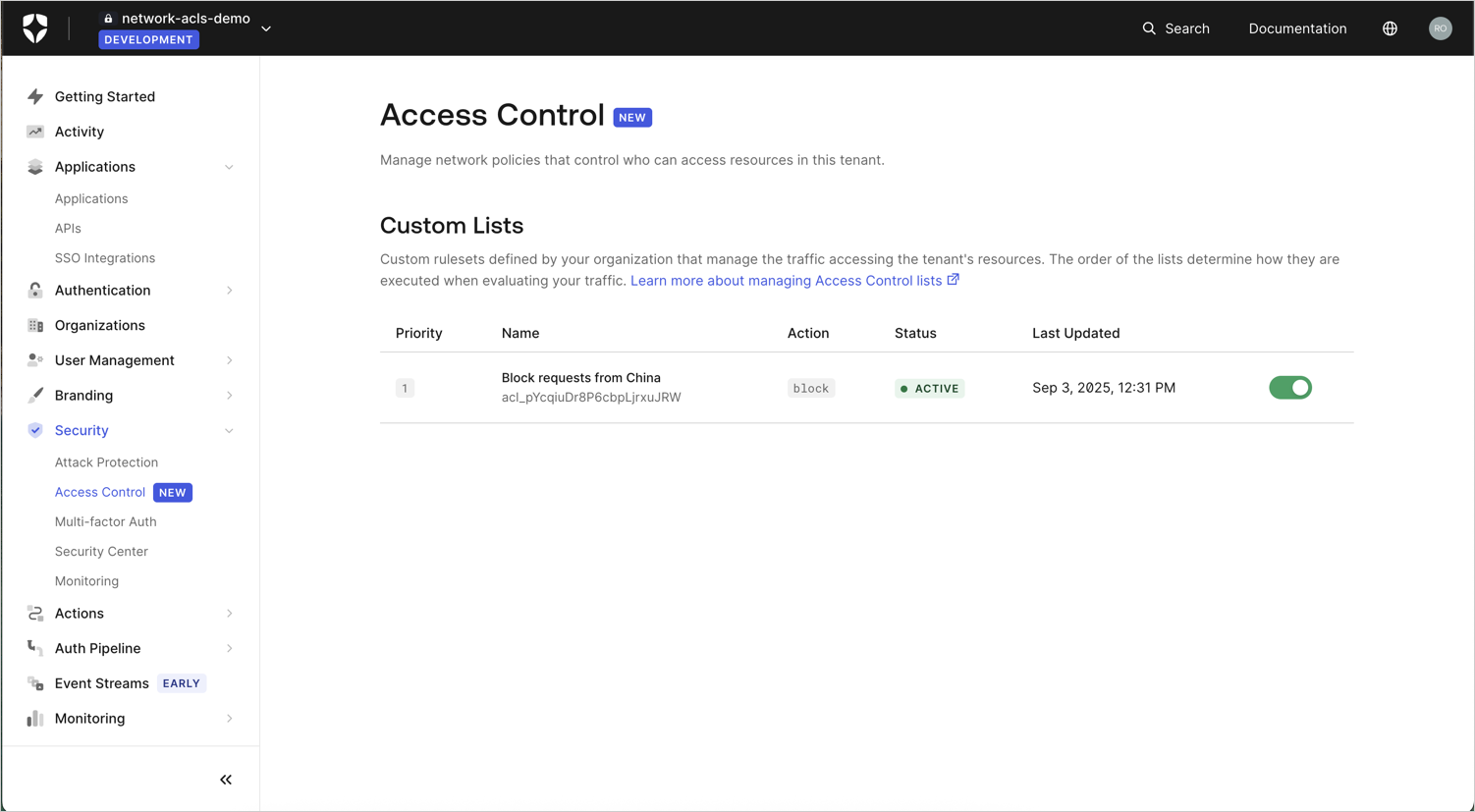
Go to [Dashboard > Security > Access Control](https://manage.auth0.com/#/security/access-control) to view a list of your existing rules.
| Column name | Description | Related API response field |
| ------------ | ----------------------------------------------------------------------------------------------- | -------------------------- |
| Priority | Ordinal number indicating when the rule is evaluated | `priority` |
| Name | Description of the rule's purpose or functionality | `description` |
| Action | The [action](/docs/secure/tenant-access-control-list/reference#actions) that the rule performs. | `action` |
| Status | Value indicating whether the rule is active or disabled. | `active` |
| Last Updated | Datetime stamp of when the rule was last updated. | `updated_at` |
The **Status** column displays the status of the rule (**Active** or **Disabled**).
## View rules
You can view existing Tenant ACL rules using the following Management API endpoints. You need a [Management API access token](/docs/secure/tokens/access-tokens/management-api-access-tokens/get-management-api-access-tokens-for-production) with indicated scopes.
| Action | Endpoint | Required scope |
| -------------- | -------------------------------------------------------------------------------------------------------------------- | ------------------- |
| View a rule | [Get a specific access control list entry for a tenant](/docs/api/management/v2/network-acls/get-network-acls-by-id) | `read:network_acls` |
| View all rules | [Get all access control list entries for a tenant](/docs/api/management/v2/network-acls/get-network-acls) | `read:network_acls` |
Go to [Dashboard > Security > Access Control](https://manage.auth0.com/#/security/access-control) to view a list of your existing rules.
| Column name | Description | Related API response field |
| ------------ | ----------------------------------------------------------------------------------------------- | -------------------------- |
| Priority | Ordinal number indicating when the rule is evaluated | `priority` |
| Name | Description of the rule's purpose or functionality | `description` |
| Action | The [action](/docs/secure/tenant-access-control-list/reference#actions) that the rule performs. | `action` |
| Status | Value indicating whether the rule is active or disabled. | `active` |
| Last Updated | Datetime stamp of when the rule was last updated. | `updated_at` |
 ## Learn more